The first 10 minutes of class will be spent working in Edmodo. Once you get to Edmodo you will see what you are to do for class. This will be an interactive discussion for today.
Once we complete the Edmodo interactive discussion, if you have not yet finished FA7 you will need to complete that today and submit it to me by email. The instructions are still on yesterday's blogpost.
After completing FA7 if you have any missing work get it done. I will read off who has missing work and who does not.
The next step is to work on the Alice tutorial. If you have finished one of the tutorials then you can start working on the other tutorial.

Showing posts with label discussion. Show all posts
Showing posts with label discussion. Show all posts
Wednesday, March 28

Thursday, September 22
Thursday, Sept. 22
- If you are supposed to define words for this week you MUST come in during lunch!! Others are relying on you to help them, just as you did last week or will in the future. This is a group effort, so you must pull your weight and help everyone! Those who do not do their job will lose points (if you are scheduled for this week and you haven't done anything yet you've already lost some points).
- If you haven't posted your response and 2 replies to Edmodo for this week's discussion, you need to do so by Friday, Sept. 23 at midnight. Here is the discussion prompt again: What do you feel is the most important aspect of Internet safety? Why? Explain your answer in detail.
- Review all keys learned (practice! practice! practice!)
- Today we will do our first speed test. This will not be for a grade, but will help you in determining where you are at, and probably more importantly where you should be. These are not something to get stressed out about, but if you are not performing technique correctly then you can expect your times to be slower than those who do perform technique correctly. Of course, that's not true for everyone - but for the overwhelming majority doing things correctly means that you will have better times over the long haul.
- Create a folder in your account and label it Computer Applications. This is part of what is called File Maintenance, which means to organize your files so that you can find your information. Learning how to correctly save is also part of File Maintenance.
- We will start learning today how to format in Microsoft Word. We will cover the following topics: changing fonts, changing font sizes, changing the justification of information in Word, highlighting words in color, changing the font color, Bold, Italicize, Underline, bulleted lists, numbered lists, increase indent, decrease indent, undo, and redo. The formatting activity is located at the bottom of this post.
- Don't forget - Vocab quiz tomorrow!!
Monday, September 19
Week of September 19
1. After finishing our Internet Safety unit last week, I hope all of you have gained a better perspective and appreciation for all the negative things that can happen if you are not careful and smart about what you do online! The Internet is a great tool, but you must also be wary of those who use it to harm others. Living in Geneseo affords us a certain amount of shelter (the feeling that nothing "bad" can happen to us) - but I would recommend you keep in mind that those who abuse the Internet don't care who they attack, they just want to attack someone. Stay safe online!
For this week, you have a discussion post to Edmodo that you need to make that is directly related to your Internet Safety project. Please post an original response to the following writing prompt (notice how this is in yellow - all discussion prompts will be seen in yellow on the blog from now on):
What do you feel is the most important aspect of Internet safety? Why? Explain your answer in detail.
Remember that you are to post an original response to this discussion question, and then you must also post at least 1 reply to 2 different classmates (that's a total of at least 2 replies - but replying more than twice is perfectly ok!). When you reply, challenge the person you are replying to to defend what they have written. Does their reasoning for stating what is the most important aspect of Internet Safety make sense? If not, reply by giving examples of why your experience is different and ask them if your experience changes their mind. Ultimately - challenge them to defend what they have written!
Your original response and 2 replies are due by Friday, Sept. 23.
(notice how that due date is in red - that will continue on the blog so you can tell when the due date of a specific assignment is)
2. Vocabulary - If you are on the list for defining this week's vocabulary words make sure that you get your definitions done before class on Wednesday. If you need to meet with your group, do that today and decide who is doing what. That should take your group all of about 2 minutes (at most) to figure out. Remember to post your definitions to the wikispaces vocabulary page for your specific hour. We will have a Vocab quiz over Vocab list #2 (Hardware #2) on Friday, Sept. 23rd.
3. We will be learning several new keys this week. They will include the B (left index/1st finger), the Y (right index/1st finger), the M (right index/1st finger), the X (left ring/3rd finger), the P (right little/4th finger), and the V (left index/1st finger).
4. Blind Assignment - we talked about doing this two weeks ago and just ran out of room to include it in what we were doing. We will do this for practice on Tuesday of this week, then next week we will do this for a grade. This is the type of assignment that tells me who is using the correct fingers and who is not - those who don't use the correct fingers usually do poorly on this assignment. Therefore, if that describes you then you may want to start using the correct fingers!
5. Correct fingers assignment #2 - We did the first one of these a couple of weeks ago. This is an assignment that you will do and be asked which finger is used on which key. We will probably do this on Wednesday of this week - and it will be graded.
6. We will also have a technique grade this week.
7. Formatting activity #1 - towards the end of the week we will be doing our first formatting activity. We will have quite a few of these throughout the semester. These are activities that will help you learn more about how to use Microsoft Word and Excel (most of them are for Word - only 1 or 2 are for Excel). These will be in-class activities that will guide you through a series of steps to learn a particular skill, or set of skills, in Word or Excel. This will be due on Friday, Sept. 23.
8. Have you posted to the What I learned.... page on your class wiki? Remember, the class with the most posts wins a reward at the end of the quarter!
9. Have you posted to the FAQ page if you have a question?
For this week, you have a discussion post to Edmodo that you need to make that is directly related to your Internet Safety project. Please post an original response to the following writing prompt (notice how this is in yellow - all discussion prompts will be seen in yellow on the blog from now on):
What do you feel is the most important aspect of Internet safety? Why? Explain your answer in detail.
Remember that you are to post an original response to this discussion question, and then you must also post at least 1 reply to 2 different classmates (that's a total of at least 2 replies - but replying more than twice is perfectly ok!). When you reply, challenge the person you are replying to to defend what they have written. Does their reasoning for stating what is the most important aspect of Internet Safety make sense? If not, reply by giving examples of why your experience is different and ask them if your experience changes their mind. Ultimately - challenge them to defend what they have written!
Your original response and 2 replies are due by Friday, Sept. 23.
(notice how that due date is in red - that will continue on the blog so you can tell when the due date of a specific assignment is)
2. Vocabulary - If you are on the list for defining this week's vocabulary words make sure that you get your definitions done before class on Wednesday. If you need to meet with your group, do that today and decide who is doing what. That should take your group all of about 2 minutes (at most) to figure out. Remember to post your definitions to the wikispaces vocabulary page for your specific hour. We will have a Vocab quiz over Vocab list #2 (Hardware #2) on Friday, Sept. 23rd.
3. We will be learning several new keys this week. They will include the B (left index/1st finger), the Y (right index/1st finger), the M (right index/1st finger), the X (left ring/3rd finger), the P (right little/4th finger), and the V (left index/1st finger).
4. Blind Assignment - we talked about doing this two weeks ago and just ran out of room to include it in what we were doing. We will do this for practice on Tuesday of this week, then next week we will do this for a grade. This is the type of assignment that tells me who is using the correct fingers and who is not - those who don't use the correct fingers usually do poorly on this assignment. Therefore, if that describes you then you may want to start using the correct fingers!
5. Correct fingers assignment #2 - We did the first one of these a couple of weeks ago. This is an assignment that you will do and be asked which finger is used on which key. We will probably do this on Wednesday of this week - and it will be graded.
6. We will also have a technique grade this week.
7. Formatting activity #1 - towards the end of the week we will be doing our first formatting activity. We will have quite a few of these throughout the semester. These are activities that will help you learn more about how to use Microsoft Word and Excel (most of them are for Word - only 1 or 2 are for Excel). These will be in-class activities that will guide you through a series of steps to learn a particular skill, or set of skills, in Word or Excel. This will be due on Friday, Sept. 23.
8. Have you posted to the What I learned.... page on your class wiki? Remember, the class with the most posts wins a reward at the end of the quarter!
9. Have you posted to the FAQ page if you have a question?
Friday, September 16
Friday, September 16
1. The first priority today will be to take the vocab quiz. I will give you a couple of minutes to quickly review at the beginning of the hour - then we'll take the quiz.
One note about our quizzes - there is extra credit built into them! If you remember this week there were 11 words - but the quiz will only be worth 10 points. So, if you get all of the questions correct then you will get 11 out of 10 points - or one extra credit point.
All of the vocab quizzes will be taken on Classmarker, so you will need to go to that website and log in - but not until Mr. Pardoe gives you the ok!! It is critical that you remember to click on the Finish now button twice when you have completed the quiz. If you fail to click on the button twice after completing the quiz your score will not be registered, and the only way to correct this situation is to take the quiz again.
2. Once you have completed the quiz you may move to work with your partner. However, realize that other people may still be working on their quiz, so please give them the courtesy of being quiet so they can concentrate on finishing.
In order to publish your movie on Xtranormal, once you have finished making all changes to the movie click on "Publish". Once your movie has been published to the Xtranormal website, you should see a screen that looks similar to this:

In order for me to be able to watch your movie you'll need to copy the URL. Here is where the URL is located:

To copy this click your mouse in the area where the website is located, then hold down your Apple key and click the A key (this will select the entire URL). Next, copy it (hold down the Apple-key and click the C key). Once you have copied it you can paste it into a new email message from your gmail account.
Send your email to: dpardoe@dist228.org. In your email put "Internet Safety Project" (without the quotes) in the subject line. Then make sure to include both of the partners' names at the bottom of the email.
This all needs to be done by the end of class TODAY!
3. If you have a missing assignment and you are all done with your Internet Safety Project now would be the perfect time to get it done and handed in. Remember, getting partial credit is better than getting no credit!
4. Also, there is a new discussion post that you need to make by next Friday, Sept. 23. It is as follows: What do you feel is the most important aspect of Internet Safety? Why? Explain your answer in detail.
5. If you are done with everything you can go to the Website Resources page on the blog and practice your keying. Only do lessons on the websites - and you should only be working on those keys that we have learned.
6. Lastly, if you are scheduled to help define the vocab list for next week there is nothing wrong with getting a head start today. I would suggest you quickly meet with the rest of your group members and determine who is going to define what. Then you can post your definitions anytime after class today.
One note about our quizzes - there is extra credit built into them! If you remember this week there were 11 words - but the quiz will only be worth 10 points. So, if you get all of the questions correct then you will get 11 out of 10 points - or one extra credit point.
All of the vocab quizzes will be taken on Classmarker, so you will need to go to that website and log in - but not until Mr. Pardoe gives you the ok!! It is critical that you remember to click on the Finish now button twice when you have completed the quiz. If you fail to click on the button twice after completing the quiz your score will not be registered, and the only way to correct this situation is to take the quiz again.
2. Once you have completed the quiz you may move to work with your partner. However, realize that other people may still be working on their quiz, so please give them the courtesy of being quiet so they can concentrate on finishing.
In order to publish your movie on Xtranormal, once you have finished making all changes to the movie click on "Publish". Once your movie has been published to the Xtranormal website, you should see a screen that looks similar to this:

In order for me to be able to watch your movie you'll need to copy the URL. Here is where the URL is located:

To copy this click your mouse in the area where the website is located, then hold down your Apple key and click the A key (this will select the entire URL). Next, copy it (hold down the Apple-key and click the C key). Once you have copied it you can paste it into a new email message from your gmail account.
Send your email to: dpardoe@dist228.org. In your email put "Internet Safety Project" (without the quotes) in the subject line. Then make sure to include both of the partners' names at the bottom of the email.
This all needs to be done by the end of class TODAY!
3. If you have a missing assignment and you are all done with your Internet Safety Project now would be the perfect time to get it done and handed in. Remember, getting partial credit is better than getting no credit!
4. Also, there is a new discussion post that you need to make by next Friday, Sept. 23. It is as follows: What do you feel is the most important aspect of Internet Safety? Why? Explain your answer in detail.
5. If you are done with everything you can go to the Website Resources page on the blog and practice your keying. Only do lessons on the websites - and you should only be working on those keys that we have learned.
6. Lastly, if you are scheduled to help define the vocab list for next week there is nothing wrong with getting a head start today. I would suggest you quickly meet with the rest of your group members and determine who is going to define what. Then you can post your definitions anytime after class today.
Tuesday, September 13
Tuesday, September 13
To start today we are going to start working in Word. We will learn the W and the Right shift key today. We will be using page 11 in the book.
After we complete our work learning new keys, you will have the rest of the hour to work on your Internet Safety project. After seeing where we were at yesterday the project will not be due until this Friday. However, it must be completed before you leave class on Friday for it to be considered handed in on time.
Also, there is a new discussion post that you need to make by next Friday, Sept. 23. It is as follows:
What do you feel is the most important aspect of Internet Safety? Why? Explain your answer in detail.
**REMINDER**
For those who are working on the vocab for this week, your definitions need to be completed by the time class starts tomorrow!!
If you have something to add to the FAQ or the I learned in Computer Apps page on the wiki then make sure to enter your information.
After we complete our work learning new keys, you will have the rest of the hour to work on your Internet Safety project. After seeing where we were at yesterday the project will not be due until this Friday. However, it must be completed before you leave class on Friday for it to be considered handed in on time.
Also, there is a new discussion post that you need to make by next Friday, Sept. 23. It is as follows:
What do you feel is the most important aspect of Internet Safety? Why? Explain your answer in detail.
**REMINDER**
For those who are working on the vocab for this week, your definitions need to be completed by the time class starts tomorrow!!
If you have something to add to the FAQ or the I learned in Computer Apps page on the wiki then make sure to enter your information.
Thursday, September 8
Thursday, September 8
Today we have several things we need to accomplish.


- Learn how to share documents in Google Docs (very easy!!)
- Watch Internet Safety video
- Research with partner for Internet Safety presentation.
Originally we were going to learn the W and the Right Shift key this week as well, but I have decided to push that back to next week. I also had talked earlier in the week about doing a blind assignment - we'll save that for a later date also in order to avoid trying to do too much this week.
Also, don't forget that you have your 2 entries in Edmodo that must be completed by tomorrow night at midnight. We discussed in class on Tuesday how to accomplish that - follow the guidelines we talked about in order to complete that assignment.
Sharing documents in Google Docs:
First you need to have a document already saved in Google docs. Once you have a document saved, open it. When the document is open, in the top-right hand corner you will see the following:
Click on the "Share" button. Then you'll see a window that looks like this:

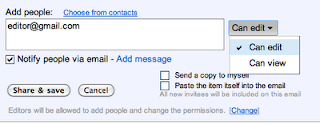
At the bottom of the window, where it says "Add people", you'll need to type in the email address of the person that you want to share your document with. When you click in the bar to start typing in the email address of the person you want to share the document with, you'll see the window changes to look like below:

Here you've got several choices to make. First, who are you sharing with? Type in their email. Next, Can they edit the document (make changes), or can they just view it? Below the box where you typed in emails you'll probably want to check the box to notify the people that you are sharing the document with. Do you want to send a copy to your email? If so, click on that box. And, if you want to send the document in the email you can do that also by clicking on that box.
When you have made all of your selections, click on "Share & save". Your friend that you have shared with will receive an email immediately after you have clicked on that button, and now both of you can view and/or edit the document that you are using to collect your research!
Internet Safety video:
Protecting Your Reputation Online:
Tuesday, September 6
Tuesday, September 6
Today, we have a couple of things that we are going to accomplish:
- Review all keys learned
- Learn the U and the C keys
- Review discussion goals on Edmodo. Today we will practice in class how to "challenge" a classmate and what they have posted on the discussion. "Challenging" can take many forms, but it needs to be done in a way that you are not being rude to the person. It is always ok to challenge what someone thinks by asking them to defend their answer (in fact this is what we want to happen!) - but make sure you challenge what is written and not the individual. In other words you wouldn't say something like this: "I think you are stupid for saying...". That is a challenge to the individual. Instead you might say something like this: "I disagree with what you said about (enter statement here). My experience is that (enter your experience here). What do you think?" You've not only challenged them to think about what they wrote, but you have created further discussion, and a better understanding of the topic at hand.
Tuesday, August 30
Tuesday, August 30
In class today we are going to set up your Edmodo account. You will need a special code in order to set this up - I'll give this to you in class. In addition, you will have the following discussion that you will need to post to Edmodo by Friday:
REMINDER! Your "10 things about me" email is due tomorrow at midnight. Make sure you are formatting this correctly - each of your 10 facts has to be about the number that represents it. For example, next to 8 you need to say something about you that has to do with the number 8. So, you might say "I have been to Lake of the Ozarks 8 times in my life".
What has been the most difficult part so far about learning to key correctly? Why has it been difficult?When you have a discussion post to enter on Edmodo you have several things that you need to accomplish:
- Enter an original response to the discussion question(s).
- Respond to at least 2 classmates. When you respond, KEEP THE CONVERSATION GOING! An easy way to keep the conversation going is to ask questions, although that isn't the only way to keep the conversation moving. What you don't want to say is "I agree", "You think like I do", "I like the way you think", or something else along those lines. These are called discussion stoppers because they stop the discussion - nothing else needs to be said from the person you are responding to.
- You should always respond when someone asks you a question. When you don't respond it's the same as ignoring someone. If you're talking in a group conversation with 5 people and someone asks you a question, what would that person think if you didn't respond? How would you feel if you asked someone a question and they didn't respond to you? You'd probably think it was rude that they didn't answer your question.
REMINDER! Your "10 things about me" email is due tomorrow at midnight. Make sure you are formatting this correctly - each of your 10 facts has to be about the number that represents it. For example, next to 8 you need to say something about you that has to do with the number 8. So, you might say "I have been to Lake of the Ozarks 8 times in my life".
Subscribe to:
Posts (Atom)